Skip to content

What Size Bag for a 16-Inch Laptop? A Measuring Guide
This guide is about getting that answer before you buy, with a tape measure and two numbers.
"16-inch" isn't the bag size
Laptop sizes are named after the screen, measured on the diagonal. A "16-inch" laptop has a display of roughly 16 inches corner to corner. The body around it is a different shape and size, and it varies by maker and by year.
So two laptops sold as 16-inch can have quite different footprints. A thin bezel design can be smaller than an older 15-inch model. A gaming laptop with a large cooling system can be thicker than either.
Bags inherit the same vague label. "Fits up to 16 inches" usually means the maker measured one or two specific laptops. Whether yours is one of them is the question.
Measure your laptop
You need two numbers: width (side to side, with the laptop closed) and depth (front edge to hinge). Thickness matters less for a sleeve, but note it if you use a thick case.
The easiest way is to look them up. Apple lists exact dimensions for current models on its MacBook Pro specs page, and older models on individual tech-spec pages such as this one. Most other makers publish the same on their support sites. Find your exact model (it's usually printed on the underside of the laptop or listed in its system settings) rather than guessing from the year.
If you'd rather measure, close the laptop, lay it on a table and run a tape along the longest edge, then the shorter one. Round up, not down.
Then add your case. A hard shell adds a little to every dimension. A padded sleeve-within-a-sleeve can add half an inch or more.
Sleeve vs compartment
A bag can carry a laptop in two ways:
- A dedicated sleeve: a padded slot sized for the laptop, often with a strap or flap to hold it. It keeps the laptop upright, separate and protected from whatever else is in the bag.
- A general compartment: the laptop shares space with everything else. Any size will "fit", but it moves around and takes knocks from chargers and bottles.
A sleeve is better for the laptop. It's also less forgiving, because it has fixed dimensions. That's why the sleeve size, not the bag's outer size, is the number to compare.
The bag's outer dimensions matter for other questions, like whether it fits under an airline seat. We cover that separately in Is a Briefcase a Personal Item?.
Snug is a feature (and sometimes a problem)
Here is a verified review of our own bag. The criticism is the useful part:
"This is the almost perfect Briefcase. I‘d happily buy another one if the zipper wouldn’t feel sharp (im always afraid to scratch my MacBook when putting it inside) and the laptop case wouldn’t be so snug for a 15.xx” Laptop." — J.B., verified buyer, Sep 2 2026
He's right on both counts, and they're connected.
The Alto's sleeve is cut close on purpose. A laptop that fits snugly doesn't slide around when you walk, doesn't drift to the bottom of the bag, and isn't banging against the frame every time you set the bag down. That's the job a sleeve is meant to do.
The cost is that loading takes a little care. With a close-fitting sleeve, you guide the laptop in rather than drop it, and you keep it clear of the zip as it passes the opening. Another buyer, A. (verified buyer, Mar 24 2024), said much the same: "I wish it could be opened wider to avoid scratching my laptop with the zipper." If you swap your laptop in and out many times a day and want a loose drop-in fit, a snug sleeve may annoy you. That's worth knowing before you buy, not after.
And the general rule from all of this: if your laptop measures right at a sleeve's limit, expect snug. If it measures over, it won't fit, whatever the listing says.

The Alto's sleeve: 15.3 x 10.2 in
Here are the numbers, stated plainly.
| Alto Briefcase | |
|---|---|
| Laptop sleeve (inside) | 15.3 x 10.2 in, padded, velcro strap |
| Made for | a 16-inch MacBook Pro, snugly |
| Bag outer size | 16.1 x 11 x 5.1 in |
| Weight empty | 3.3 lb |
| Capacity | 13 L |
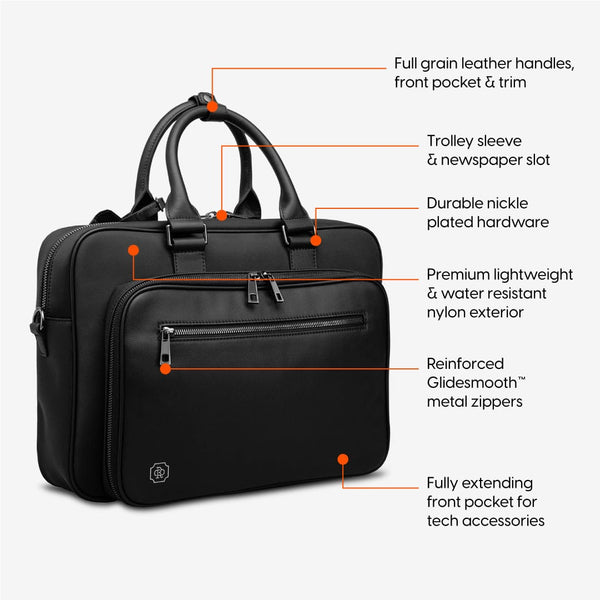
| Layout | dual compartment, 13 pockets incl. tech compartment, documents sleeve, tablet pocket |
| Materials | full-grain leather trim, handles and front pocket over a water-resistant nylon-twill body |
How to use that table: compare your laptop's width with 15.3 in and its depth with 10.2 in. If both are under, with room for any case, it fits. Smaller laptops are held by the velcro strap so they don't slide. If either number is over, choose a different bag.
The sleeve is one of several named places in the Alto Briefcase. If you're planning how the rest of the kit goes in, our guide on how to organize a work bag walks through it pocket by pocket. For the bigger buying decision, The Best Work Bag for Men: A 9-Point Test puts laptop fit alongside weight, materials and travel.
One more honest data point. A verified buyer, M. (Jun 21 2024), wrote: "Would be perfect if it were like 10% larger." The Alto is a slim briefcase. If you carry a large laptop plus a lot besides, measure your whole kit, not just the laptop.
Flying with it
At most US airports, laptops come out of the bag at security. TSA's laptops page (updated July 15, 2026) says: "Please remove the laptops from your bag and place it in a separate bin for X-ray screening. TSA PreCheck® travelers do not need to remove shoes, laptops, 3-1-1 liquids, belts or light jackets."
That's another argument for a sleeve that's quick to reach: the laptop is the one item you'll take out in public, in a hurry. If you carry two, our earlier post on how many laptops you can bring on a plane covers that.
A two-minute checklist
- Find your exact laptop model.
- Look up (or measure) width and depth.
- Add your case.
- Compare with the bag's sleeve dimensions, not its outer size.
- Right at the limit means snug; over means no.
FAQ
- Will a 16-inch laptop fit in a bag sold as 16-inch?
- Not necessarily. The label usually refers to the screen diagonal, not the body. Check the laptop's width and depth on the maker's spec page, then compare them with the bag's stated sleeve dimensions. Allow for any case or skin you use.
- What are the Alto's laptop sleeve dimensions?
- The Alto's padded laptop sleeve measures 15.3 x 10.2 in and has a velcro strap. It is made to hold a 16-inch MacBook Pro snugly. Smaller laptops are held in place by the strap.
- Will a 15-inch laptop fit in the Alto?
- Most will, but measure first. One verified buyer found the sleeve snug for a 15.x-inch laptop. Compare your laptop's width and depth with 15.3 x 10.2 in, and remember that a thick case adds to both.
- Is a snug laptop sleeve a good thing?
- Usually. A sleeve that fits closely stops the laptop shifting and knocking against the bag when you walk. The trade-off is that sliding it in and out takes a little more care, especially past the zip.
- Do I have to take my laptop out at airport security?
- TSA asks travelers to remove laptops from their bag and place them in a separate bin for X-ray screening. TSA PreCheck travelers do not need to remove laptops. The final decision rests with the TSA officer.
Sources
- MacBook Pro Tech Specs, Apple — current 16-inch MacBook Pro dimensions
- MacBook Pro technical specifications, Apple Support — model-specific spec page
- Laptops, TSA What Can I Bring? — laptop screening rule and PreCheck exception (updated Jul 15, 2026)